> ## Documentation Index
> Fetch the complete documentation index at: https://docs.submagic.co/llms.txt
> Use this file to discover all available pages before exploring further.
# Update Project
> Update an existing video project with new settings, features, or media insertions
# Update Project
Update an existing video project with new settings, AI features, or user media (B-roll) insertions. This endpoint allows you to modify project parameters and enhance your video with additional features or custom media content from your library.
This endpoint requires authentication and has a rate limit of 100 requests per
hour. After modifying a video, you'll need to re-export to see the changes
using the export endpoint. When using `removeBadTakes`, the response may take
1-2 minutes as our AI processes the video.
## Authentication
Your Submagic API key starting with `sk-`
## Path Parameters
The unique identifier (UUID) of the project to update
## Request Body
All fields are optional. Only provide the fields you want to update. If a field is provided with a different value from the current project settings, it will be updated.
Edit the project's captions. Fetch the current transcript from
[Get Project](/api-reference/get-project), change anything you want (text,
timing, add or remove words), and send the **full** array back — it replaces
the transcript, so include every word you want to keep. The caption layout is
rebuilt automatically.
Requirements (otherwise `VALIDATION_ERROR`): the project must already be
transcribed, and words must stay in chronological order — each `startTime`
greater than or equal to the previous word's.
Can be combined with other fields in the same request: the words are applied
first, then the rest. If the words edit fails, nothing else is applied.
The word's id from the Get Project response. Keep it to edit an existing
word; **omit it to add a new word.**
The word text. For `silence` segments it is ignored and stored as empty
(silence never renders caption text).
Segment type. Must be one of `"word"`, `"silence"`, or `"punctuation"` —
any other value is rejected with `VALIDATION_ERROR`.
Start time in seconds (must be ≥ 0).
End time in seconds (must be ≥ `startTime`).
Returns the standard update response (`Project updated successfully`).
Re-export the project to render the edited captions.
Automatically remove silence from the video at the specified pace. Allowed
values: `natural`, `fast`, `extra-fast`. - `extra-fast`: 0.1-0.2 seconds of
silence removal - `fast`: 0.2-0.6 seconds of silence removal - `natural`: 0.6+
seconds of silence removal
Automatically detect and remove bad takes and silence from the video using AI
analysis. **Note: This process may take 1-2 minutes to complete.**
Hide captions from the exported video. Optional, defaults to `false`.
Update the animated hook caption shown at the start of the video. Set to
`true` to enable the default AI-generated hook, `false` to remove it, or pass
an object with optional overrides:
* `text`: Custom copy (1-100 characters)
* `template`: Hook title template name (defaults to `"tiktok"`). Fetch valid
names using the [hook title templates
endpoint](/api-reference/hook-title-templates).
* `top`: Vertical position between 0-80 (default `50`)
* `size`: Font size between 0-80 (default `30`)
Template names are validated before processing resumes; invalid names return
`VALIDATION_ERROR` immediately.
Optional background music track. When provided, replaces any existing
background music on the project.
UUID of the music track. Accepts either an `AUDIO` file from your media
library (use [List User Media](/api-reference/list-user-media)) or a Trendy
Music track ID (copied from the editor's **Edit Audio → Trendy Music** tab).
Playback volume (1-100)
Start offset within the audio file in seconds. Defaults to `0`.
Apply a fade-in/fade-out effect to the music track. Defaults to `true`.
Array describing B-roll edits. Provide at least one entry when this field is
included. Each item must include a `type` field to specify whether it's user
media from your library or AI-generated content.
Must be set to `"user-media"`
Start time in seconds where the media should begin (must be ≥ 0)
End time in seconds where the media should end (must be greater than
`startTime`)
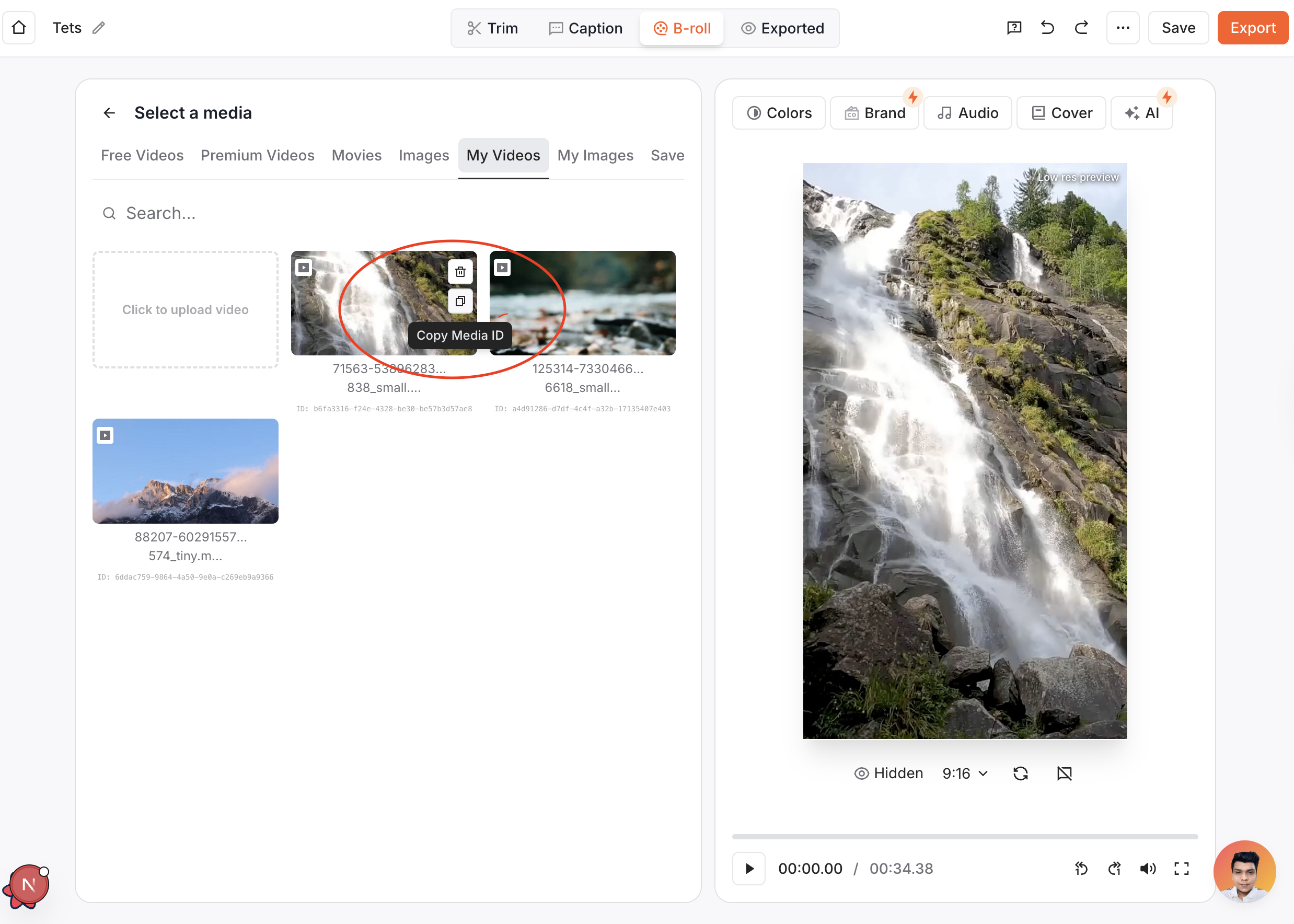
UUID of the user media from your library. You can find this ID in the editor's 'B-roll' tab → 'My videos' section under each video.
Layout mode for the inserted media. Available values depend on the media type:
**Video media:** `"cover"`, `"contain"`, `"rounded"`, `"square"`, `"split-50-50"`, `"split-35-65"`, `"split-50-50-bordered"`, `"split-35-65-bordered"`, `"pip-top-right"`, `"pip-bottom-right"`
**Image media:** `"cover"`, `"contain"`, `"rounded"`, `"square"`
Must be set to `"ai-broll"`
Start time in seconds (must be ≥ 0)
End time in seconds. Must be greater than `startTime` and no more than 12
seconds later.
1-2500 character description of what the AI should render. This field is
mandatory whenever `type: "ai-broll"` is present.
Layout mode for the AI B-roll. Allowed values: `"cover"`, `"contain"`, `"rounded"`, `"square"`, `"split-50-50"`, `"split-35-65"`, `"split-50-50-bordered"`, `"split-35-65-bordered"`, `"pip-top-right"`, `"pip-bottom-right"`
**Important:** Each item must have a `type` field. Items entries cannot overlap
each other in time.
## AI B-roll Workflow & Credits
* Every AI B-roll item consumes **3 AI credits**. Requests fail with
`VALIDATION_ERROR` if the authenticated user lacks enough credits (unless their
balance is unlimited).
* When AI B-roll work is accepted, the project is moved back to `processing` and
the generation jobs run asynchronously. Your webhook or polling logic should
watch for the project to return to `completed`.
* Stock/user-media updates continue to succeed immediately with the traditional
`Project updated successfully` message.
## Finding User Media ID
To find your `userMediaId`:
1. Go to the Submagic editor
2. Navigate to the **'B-roll'** tab
3. Add a B-roll to access your media library
4. Go to the **'My videos'** tab
5. Each video will display its unique media ID that you can use with this API
 ## Response
Success message confirming the project update. When AI B-roll work is accepted,
the message is `Project update accepted` to indicate asynchronous rendering.
The unique identifier of the updated project
Updated processing status of the project. If AI B-roll generation was
requested, the project is moved to `processing` until the renders finish.
## Error Responses
Error code: `NOT_FOUND` or `VALIDATION_ERROR`
Detailed error message explaining what went wrong
```json theme={null}
{
"error": "VALIDATION_ERROR",
"message": "Invalid template name"
}
```
```bash cURL theme={null}
curl -X PUT "https://api.submagic.co/v1/projects/550e8400-e29b-41d4-a716-446655440000" \
-H "x-api-key: sk-your-api-key-here" \
-H "Content-Type: application/json" \
-d '{
"removeSilencePace": "fast",
"removeBadTakes": true,
"hookTitle": {
"text": "New intro in 15 seconds",
"template": "laura",
"top": 40,
"size": 28
},
"music": {
"userMediaId": "88a08eec-712a-45d0-8d0b-3b631700cb3a",
"volume": 25,
"startFromTime": 10,
"fade": true
},
"items": [
{
"type": "user-media",
"startTime": 10.5,
"endTime": 15.2,
"userMediaId": "123e4567-e89b-12d3-a456-426614174000",
"layout": "pip-top-right"
},
{
"type": "ai-broll",
"startTime": 25,
"endTime": 31,
"prompt": "smooth slider shot of a team collaborating in a modern studio",
"layout": "split-50-50"
}
]
}'
```
```javascript JavaScript theme={null}
const updateProject = async (projectId, updateData) => {
const response = await fetch(
`https://api.submagic.co/v1/projects/${projectId}`,
{
method: "PUT",
headers: {
"x-api-key": "sk-your-api-key-here",
"Content-Type": "application/json",
},
body: JSON.stringify(updateData),
}
);
const result = await response.json();
console.log("Project updated:", result.message);
return result;
};
// Usage
const updateData = {
removeSilencePace: "fast",
removeBadTakes: true,
hookTitle: {
text: "New intro in 15 seconds",
template: "laura",
top: 40,
size: 28,
},
music: {
userMediaId: "88a08eec-712a-45d0-8d0b-3b631700cb3a",
volume: 25,
startFromTime: 10,
fade: true,
},
items: [
{
type: "user-media",
startTime: 10.5,
endTime: 15.2,
userMediaId: "123e4567-e89b-12d3-a456-426614174000",
layout: "pip-top-right",
},
{
type: "ai-broll",
startTime: 25,
endTime: 31,
prompt:
"smooth slider shot of a team collaborating in a modern studio",
layout: "split-50-50",
},
],
};
const result = await updateProject(
"550e8400-e29b-41d4-a716-446655440000",
updateData
);
```
```python Python theme={null}
import json
import requests
def update_project(project_id, update_data):
url = f'https://api.submagic.co/v1/projects/{project_id}'
headers = {
'x-api-key': 'sk-your-api-key-here',
'Content-Type': 'application/json'
}
response = requests.put(url, headers=headers, json=update_data)
result = response.json()
print(f"Project updated: {result.get('message')}")
return result
# Usage
update_data = {
'removeSilencePace': 'fast',
'removeBadTakes': True,
'hookTitle': {
'text': 'New intro in 15 seconds',
'template': 'laura',
'top': 40,
'size': 28
},
'music': {
'userMediaId': '88a08eec-712a-45d0-8d0b-3b631700cb3a',
'volume': 25,
'startFromTime': 10,
'fade': True
},
'items': [
{
'type': 'user-media',
'startTime': 10.5,
'endTime': 15.2,
'userMediaId': '123e4567-e89b-12d3-a456-426614174000',
'layout': 'pip-top-right'
},
{
'type': 'ai-broll',
'startTime': 25,
'endTime': 31,
'prompt': 'smooth slider shot of a team collaborating in a modern studio',
'layout': 'split-50-50'
}
]
}
result = update_project('550e8400-e29b-41d4-a716-446655440000', update_data)
```
```json 200 OK - Stock/User Media Only theme={null}
{
"message": "Project updated successfully",
"id": "550e8400-e29b-41d4-a716-446655440000",
"status": "processing"
}
```
```json 200 OK - AI B-roll Accepted theme={null}
{
"message": "Project update accepted",
"id": "550e8400-e29b-41d4-a716-446655440000",
"status": "processing"
}
```
```json 200 OK - Words Updated theme={null}
{
"message": "Project updated successfully",
"id": "550e8400-e29b-41d4-a716-446655440000",
"status": "completed"
}
```
```json 400 VALIDATION_ERROR - Not Transcribed Yet theme={null}
{
"error": "VALIDATION_ERROR",
"message": "Project is not transcribed yet; words can only be edited after transcription completes."
}
```
```json 404 NOT_FOUND theme={null}
{
"error": "NOT_FOUND",
"message": "Project not found"
}
```
```json 400 VALIDATION_ERROR - Invalid Time Range theme={null}
{
"error": "VALIDATION_ERROR",
"message": "endTime must be greater than startTime"
}
```
```json 400 VALIDATION_ERROR - Invalid UUID theme={null}
{
"error": "VALIDATION_ERROR",
"message": "Invalid UUID format for userMediaId"
}
```
**Important:** After updating a project, you must re-export the project to see
the changes in the final video. Use the export endpoint to generate the
updated video with your modifications. **Processing Time:** When using
`removeBadTakes`, the API response may take 1-2 minutes as our AI analyzes and
processes the video to detect and remove bad takes and silence.
## Response
Success message confirming the project update. When AI B-roll work is accepted,
the message is `Project update accepted` to indicate asynchronous rendering.
The unique identifier of the updated project
Updated processing status of the project. If AI B-roll generation was
requested, the project is moved to `processing` until the renders finish.
## Error Responses
Error code: `NOT_FOUND` or `VALIDATION_ERROR`
Detailed error message explaining what went wrong
```json theme={null}
{
"error": "VALIDATION_ERROR",
"message": "Invalid template name"
}
```
```bash cURL theme={null}
curl -X PUT "https://api.submagic.co/v1/projects/550e8400-e29b-41d4-a716-446655440000" \
-H "x-api-key: sk-your-api-key-here" \
-H "Content-Type: application/json" \
-d '{
"removeSilencePace": "fast",
"removeBadTakes": true,
"hookTitle": {
"text": "New intro in 15 seconds",
"template": "laura",
"top": 40,
"size": 28
},
"music": {
"userMediaId": "88a08eec-712a-45d0-8d0b-3b631700cb3a",
"volume": 25,
"startFromTime": 10,
"fade": true
},
"items": [
{
"type": "user-media",
"startTime": 10.5,
"endTime": 15.2,
"userMediaId": "123e4567-e89b-12d3-a456-426614174000",
"layout": "pip-top-right"
},
{
"type": "ai-broll",
"startTime": 25,
"endTime": 31,
"prompt": "smooth slider shot of a team collaborating in a modern studio",
"layout": "split-50-50"
}
]
}'
```
```javascript JavaScript theme={null}
const updateProject = async (projectId, updateData) => {
const response = await fetch(
`https://api.submagic.co/v1/projects/${projectId}`,
{
method: "PUT",
headers: {
"x-api-key": "sk-your-api-key-here",
"Content-Type": "application/json",
},
body: JSON.stringify(updateData),
}
);
const result = await response.json();
console.log("Project updated:", result.message);
return result;
};
// Usage
const updateData = {
removeSilencePace: "fast",
removeBadTakes: true,
hookTitle: {
text: "New intro in 15 seconds",
template: "laura",
top: 40,
size: 28,
},
music: {
userMediaId: "88a08eec-712a-45d0-8d0b-3b631700cb3a",
volume: 25,
startFromTime: 10,
fade: true,
},
items: [
{
type: "user-media",
startTime: 10.5,
endTime: 15.2,
userMediaId: "123e4567-e89b-12d3-a456-426614174000",
layout: "pip-top-right",
},
{
type: "ai-broll",
startTime: 25,
endTime: 31,
prompt:
"smooth slider shot of a team collaborating in a modern studio",
layout: "split-50-50",
},
],
};
const result = await updateProject(
"550e8400-e29b-41d4-a716-446655440000",
updateData
);
```
```python Python theme={null}
import json
import requests
def update_project(project_id, update_data):
url = f'https://api.submagic.co/v1/projects/{project_id}'
headers = {
'x-api-key': 'sk-your-api-key-here',
'Content-Type': 'application/json'
}
response = requests.put(url, headers=headers, json=update_data)
result = response.json()
print(f"Project updated: {result.get('message')}")
return result
# Usage
update_data = {
'removeSilencePace': 'fast',
'removeBadTakes': True,
'hookTitle': {
'text': 'New intro in 15 seconds',
'template': 'laura',
'top': 40,
'size': 28
},
'music': {
'userMediaId': '88a08eec-712a-45d0-8d0b-3b631700cb3a',
'volume': 25,
'startFromTime': 10,
'fade': True
},
'items': [
{
'type': 'user-media',
'startTime': 10.5,
'endTime': 15.2,
'userMediaId': '123e4567-e89b-12d3-a456-426614174000',
'layout': 'pip-top-right'
},
{
'type': 'ai-broll',
'startTime': 25,
'endTime': 31,
'prompt': 'smooth slider shot of a team collaborating in a modern studio',
'layout': 'split-50-50'
}
]
}
result = update_project('550e8400-e29b-41d4-a716-446655440000', update_data)
```
```json 200 OK - Stock/User Media Only theme={null}
{
"message": "Project updated successfully",
"id": "550e8400-e29b-41d4-a716-446655440000",
"status": "processing"
}
```
```json 200 OK - AI B-roll Accepted theme={null}
{
"message": "Project update accepted",
"id": "550e8400-e29b-41d4-a716-446655440000",
"status": "processing"
}
```
```json 200 OK - Words Updated theme={null}
{
"message": "Project updated successfully",
"id": "550e8400-e29b-41d4-a716-446655440000",
"status": "completed"
}
```
```json 400 VALIDATION_ERROR - Not Transcribed Yet theme={null}
{
"error": "VALIDATION_ERROR",
"message": "Project is not transcribed yet; words can only be edited after transcription completes."
}
```
```json 404 NOT_FOUND theme={null}
{
"error": "NOT_FOUND",
"message": "Project not found"
}
```
```json 400 VALIDATION_ERROR - Invalid Time Range theme={null}
{
"error": "VALIDATION_ERROR",
"message": "endTime must be greater than startTime"
}
```
```json 400 VALIDATION_ERROR - Invalid UUID theme={null}
{
"error": "VALIDATION_ERROR",
"message": "Invalid UUID format for userMediaId"
}
```
**Important:** After updating a project, you must re-export the project to see
the changes in the final video. Use the export endpoint to generate the
updated video with your modifications. **Processing Time:** When using
`removeBadTakes`, the API response may take 1-2 minutes as our AI analyzes and
processes the video to detect and remove bad takes and silence.